 Service / Troubleshooting / Help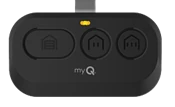
Chamberlain / LiftMaster
Chamberlain CH163 Remote
Identify your exact Chamberlain CH163 remote before checking batteries, programming or replacement options.
- Brand
- Chamberlain
- Exact model
- CH163
- Device type
- Handheld remote
- Product region
- US/Canada; verify country label
Your Chamberlain CH163 at a glance
Confirm the brand and the complete CH163 label, including any additional suffix or hardware revision. A similar case or shared model number does not establish an interchangeable remote.
CH163 battery & holder
One 3 V CR2032, positive side up. Loosen captive rear screw before separating housing; close securely without overtightening.
Programming your CH163
Setup depends on the exact receiver and hardware revision. These model notes do not establish a complete pairing sequence for your equipment.
Match both the remote and opener or external receiver. Keep the door or gate in sight and clear of people. Do not hold a LEARN button or erase memory unless the instructions for that exact equipment require it.
Model guidance →Compatibility & exclusions
Security+ 3.0 products; garage openers use white Learn. Do not apply older-generation assumptions.
No blanket gate-receiver enrollment or replacement equivalence verified.
If your CH163 is not working
Checks for CH163
- If the test fails, wait until the Learn LED turns off, potentially three minutes, before repeating.
- Remote LED ceasing to flash or a low-battery app indication can prompt battery replacement.
General troubleshooting checks.
- No response: check the marked battery type and polarity; note whether another authorized control works.
- Short range: note when the problem began and whether it changes by location. Do not alter receiver wiring.
- Damaged case or buttons: keep the model label; stop using exposed, wet or damaged electronics.
CH163 repair, parts & replacement
No exact replacement or part mapping has been confirmed for this page. A similar-looking remote, matching frequency or familiar model family is not sufficient evidence of interchangeability.
Model guides
Use the model-specific notes on this page with the instructions for your opener or receiver. A documented receiver match does not establish compatibility with every opener.
Programming preparation →