 Service / Troubleshooting / Help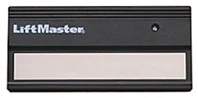
LiftMaster remotes
LiftMaster 61LM Remote
Identify your exact LiftMaster 61LM remote before checking batteries, programming or replacement options.
- Brand
- LiftMaster
- Exact model
- 61LM
- Device type
- Handheld remote
- Product region
- US
Your LiftMaster 61LM at a glance
Single-button 390 MHz fixed-code remote; DIP switches are behind the sliding battery cover.
61LM battery & holder
12 V battery; the manual specifies replacement part 10A14.
Programming your 61LM
Setup depends on the exact receiver and hardware revision. These model notes do not establish a complete pairing sequence for your equipment.
Match both the remote and opener or external receiver. Keep the door or gate in sight and clear of people. Do not hold a LEARN button or erase memory unless the instructions for that exact equipment require it.
Model guidance →Compatibility & exclusions
Requires a compatible 390 MHz fixed-code receiver, not merely any 390 MHz opener.
Battery retail size designation is not confirmed by this manual. Receiver model must be checked before choosing DIP matching or Learn enrollment.
If your 61LM is not working
Checks for 61LM
- When matching a three-button remote, switch 1 selects the intended button (+, 0 or -); copying its whole pattern without this adjustment may fail.
- Check switch numbering and all three positions before repeating setup.
General troubleshooting checks.
- No response: check the marked battery type and polarity; note whether another authorized control works.
- Short range: note when the problem began and whether it changes by location. Do not alter receiver wiring.
- Damaged case or buttons: keep the model label; stop using exposed, wet or damaged electronics.
61LM repair, parts & replacement
No exact replacement or part mapping has been confirmed for this page. A similar-looking remote, matching frequency or familiar model family is not sufficient evidence of interchangeability.
Model guides
Use the model-specific notes on this page with the instructions for your opener or receiver. A documented receiver match does not establish compatibility with every opener.
Programming preparation →